الاثنين، 23 ديسمبر 2013

Don’t run out of printer ink again (giveaway ends 1/4/14) #HPInstantInk

HP Ink
Has this ever happened to you? You are in the middle of printing out something important (or even some photos) and you start to notice some streaking? Uh-oh! You are running out of ink. Ugh!
I have had that happened to me more times then I care to remember.
I used to have a home business making personalized party favors, buttons, personalized candy wrappers and other things that involved my printer and ink – A LOT of ink. It seemed like I was heading out to the store every other week, sometimes once a week. It was frustrating.
I have to admit that I didn’t check ink levels as frequently as I should have. If I did I would have known what color/colors needed to be replaced before it was too late. There was nothing worse than being in the middle of an order and having to stop everything to rush out to the store.
These days I don’t have my home business, but I still go through a decent amount of ink thanks to my kids. They use the printer for homework and school projects. Sometimes I am unaware of how much ink they used until I run out when I am trying to print out a document or contract.
Imagine how convenient it would be if your computer was smart enough to tell you that it needed ink? Well, I can’t say that computers are smart (they don’t have a brain or cognitive skills), but there is a way that they can let you know that they need more ink thanks to the HP Instant Ink program.
HP Instant Ink Program
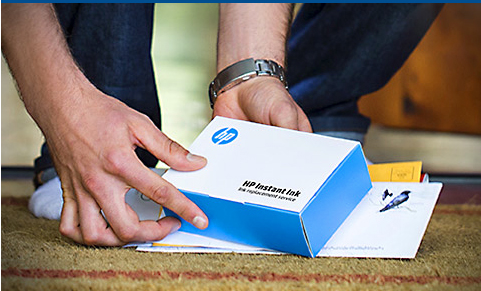
This is how the program works.
Your HP printer will tell the HP Instant Ink program when you are in need of ink. You don’t have to worry about it. HP will automatically send you the ink when you need it along with an envelope to return the empty ink cartridge for recycling.
Talk about convenient. No more having to stop what I’m doing to go to the store, pick up ink, wait online to pay and drive back home. You can get the ink that you need while you are at home.
Each ink cartridge should yield 500 pages.
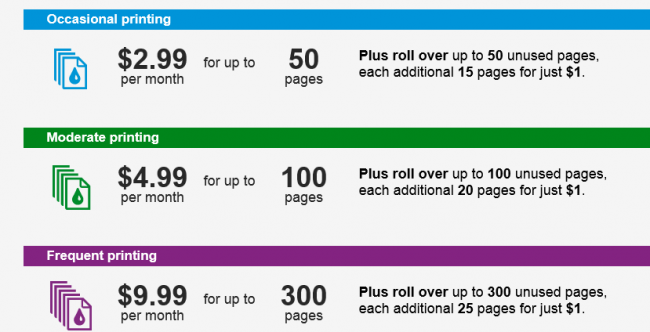
The plans are very affordable. They range in price from $2.99 – $9.99 a month, depending on how much you print.
HP Instant Ink

If you don’t print out the allotted pages you can roll over up to a month’s worth of page the next month.
There is no annual fee and you can change or cancel your plan whenever you want.
I’m currently on the $2.99 plan. That is a small fee to pay for not having to go to the store to buy ink.
The HP Instant Ink cartridges actually have a bit more ink in them compared to the ones you buy off the store shelves so they will last longer too.
Your plan is not based on how many cartridges you use so you can feel free to print as often as you like – even colorful photos.
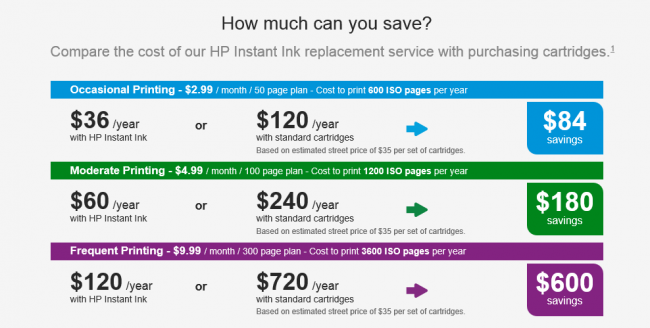
HP Instant Ink also saves you money. Check out your possible savings each year using HP Instant Ink compared to purchasing the cartridges from the store.
Savings
That is a big savings.
In order to take advantage of this service you need an eligible HP printer.
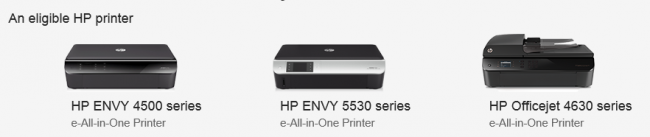
Printers
In addition you need internet connection, e-mail and a card for billing.
Whether you are an infrequent printer or someone who burns through ink cartridges rapidly, the HP Instant Ink is a valuable service. It pay for it’s self with the savings and time saved from having to keep on top of your ink levels and running to the store to purchase more.
At the time I am writing this I have not had a need to replace any of my ink cartridges. When I do I will up date this post and share my thoughts.
For more information visit the HP Instant Ink website.
What do you think about this service? Does it sound like something that you and/or your family needs? Feel free to share your thoughts.
HP would like to give a lucky reader a HP ENVY 5530 e-All-in-One printer so that you can enjoy a service like HP Instant Ink. Thank you HP!
This giveaway is open to US residents only and will end on January 4, 2014 at 11:59 PM (EST). The winner will be chosen at random using  a random number generator from all eligible entries. The winner will be notified via e-mail and will have three days to reply or a  new winner will be chosen in their place.
To enter please comment on this post and tell me what you like most about the HP Instant Ink program?
For extra entries you can use the Rafflecopter widget (below) but you must complete the initial entry requirement or the additional entries won’t qualify (I do check). Extra entries are optional.

HP LOGO

الأحد، 15 ديسمبر 2013


Eye-Fi Review & Give Away

**The product for this give away was provided free of cost for the purposes of this review/give away. All opinions are 100% my own and I do not review products that I don't believe in or use myself.**


I love taking pictures. Even before having kids, I took a ridiculous amount of pictures. Up until a few years ago, to get pictures off the camera, you needed to find the camera cord and then wait for everything to upload. Even now, clicking in your SD card (and hoping it connects on the first try) then waiting for the upload can be a pain. And let's be honest, its not like you upload pictures right after taking them. You upload them in batches and spam Facebook with pictures from the past few weeks.


This is all only, of course, if you have your laptop with you - what if you're out and about for the day or on vacation and want to share pictures on the go? Good luck with that. There HAD to be a solution for this.

The answer is Eye-Fi!

The Eye-Fi wireless memory card is the first card designed to provide high-quality digital photography with the convenience and connectivity of your mobile device.

How it works...

The card looks like any other regular SD memory card, but sends pictures like magic. Replace the SD card in any camera and in a few simple steps, any pictures taken on the card appear instantly on your smart phone or tablet, ready to share.

The Mobi has the simplest Eye-Fi set up - no computer, no account, no cloud. Just download the free Eye-Fi mobile app, enter the Mobi card's 10 digit code, and they're paired instantly. And yes, its really that easy. No IKEA style instructions here, folks.

Please don't mind my dirty camera...

Notice the little "sending" icon, moving my pictures like magic!
Take a picture or video with your camera and it instantly shows up on your chosen smart device - full resolution, to be edited and shared - no wifi needed. At the beach, on the road, at the park, writing a quick blog post - your high quality pictures are immediately shareable without finding a hotspot or booting your computer. Parents don't have time to pee during the day; sharing an adorable picture needs to be quick!
It sounds crazy, but this card has changed my life! I own the Pro X2 version, which also has the capability to transfer pictures to a computer via a wifi network, and it makes sharing pictures 100x easier than before. Here are the things I love about my card...

  • My phone camera sucks, so being able to effortlessly transfer quality pictures to share is invaluable. 
  • While traveling, I know that my pictures are backed up on my iPad and phone in the event that something happens to my camera.
  • I don't need to find a wifi network for this to work.
  • The pictures stay on the card, so you can transfer them manually on a computer if you'd like. 
  • It's especially awesome when I am writing a blog post and just need one or two pictures - not worth booting up the computer. 
  • It works on Android and iOS, so whether its my Galaxy S3 or my iPad - it all works. 


I love Eye-Fi SO much, I asked them if I could share this cool technology with my readers. They loved the idea and send me a new 8 GB Eye-Fi Mobi (MSRP $49.99) card to give away! 

Get pumped, people. This is one snazzy piece of technology.


About Eye-Fi, the Company
Eye-Fi is dedicated to building products and services that help consumers manage, nuture, and share their digital memories. Eye-Fi's patented and patent-pending technology wirelessly and automatically uploads photos and videos from digital cameras and smart phones to online, in home, and retail destinations. Eye-Fi has helped people wirelessly upload more than 500 million pictures since being founded in 2005.

Where to Buy

How to Enter
Join this giveaway via the Rafflecopter below. One lucky winner will receive one 8 GB Eye-Fi Mobi wireless memory card to enjoy! This give away ends Monday, December 23rd at 11:59pm. Good luck!

السبت، 5 أكتوبر 2013

Autumn Cooking Giveaway, Pampered Chef

Autumn Cooking Giveaway, Pampered Chef

It’s October, time for the new giveaway! The Autumn Cooking Giveaway, Featuring Pampered Chef starts today! The leaves are changing and the autumn season means it’s time to start thinking about yummy oven roasted meals. This month’s Giveaway is brought to you by the lovely  Melissa of Pampered Chef. This wonderful cranberry colored baker is the prize! Think of the comfort foods you could prepare in this terrific pampered chef cranberry colored deep baker. It makes me wish I could enter my own giveaway  :-)
This is what you will win!
Deep Covered Baker in Cranberry
deep baker giveawayYou can bake a 5-lb. chicken or turkey breast, 4-lb. roast, casseroles and more! Unglazed on the inside for perfect baking, glazed on the outside for perfect presentation. Lid inverts into baker for space-saving storage. 12½” x 9½” x 5½”, 12½ cups.
About Stoneware:
No preheating — just place food on Stoneware and cook. (Dense frozen foods like meat should be thawed first.)
Absorbs and retains heat for even baking and golden crusts.
Draws moisture away from food so it cooks light and crispy.
Virtually nonporous, so it doesn’t retain oils, odors or flavors.
Microwave-, freezer-, conventional and convection oven-safe.
Nonstick “seasoning” builds up with every use: the darker it looks, the better it cooks!
Entering is easy, log into the entry form using your email address or facebook and click on the first entry on the rafflecopter form. Confirm you are a follower of Katherines Corner. Or become a new follower. Then read the terms and conditions and click yes. Any other entries you choose to enter are all optional additional entries. Open to all living in the US over the age of 18 ends October 30th
The giveaway button is posted on the right sidebar just copy and paste the code to your blog, or you can copy and paste the image below to your blog or website with a link back to Katherines Corner.
win a covered baking dish